
Invoicing Guide
This guide is for school finance teams, office managers, and administrators who need to manage payments for Sense Path.
Payment Options
Sense Path offers two payment methods:
- Credit/Debit Card — pay online via our secure payment portal (powered by Stripe)
- Invoice — receive an invoice by email and pay within 14 days
Most schools prefer to pay by invoice, and this guide covers that process in detail.
Paying by Invoice
How to Set Up an Invoice Subscription
- Log in to Sense Path at app.sensepath.org.
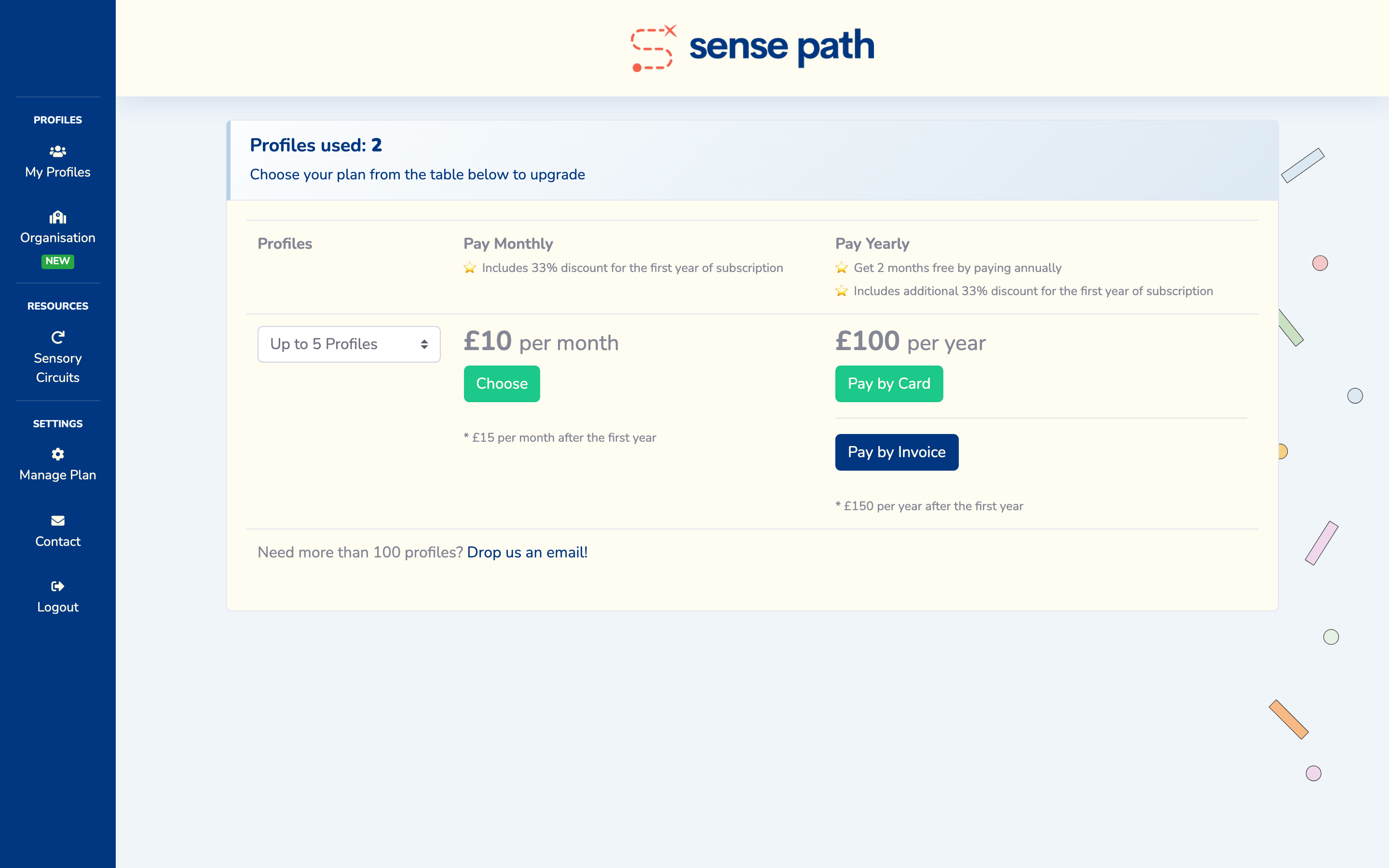
- Navigate to the Upgrade page.
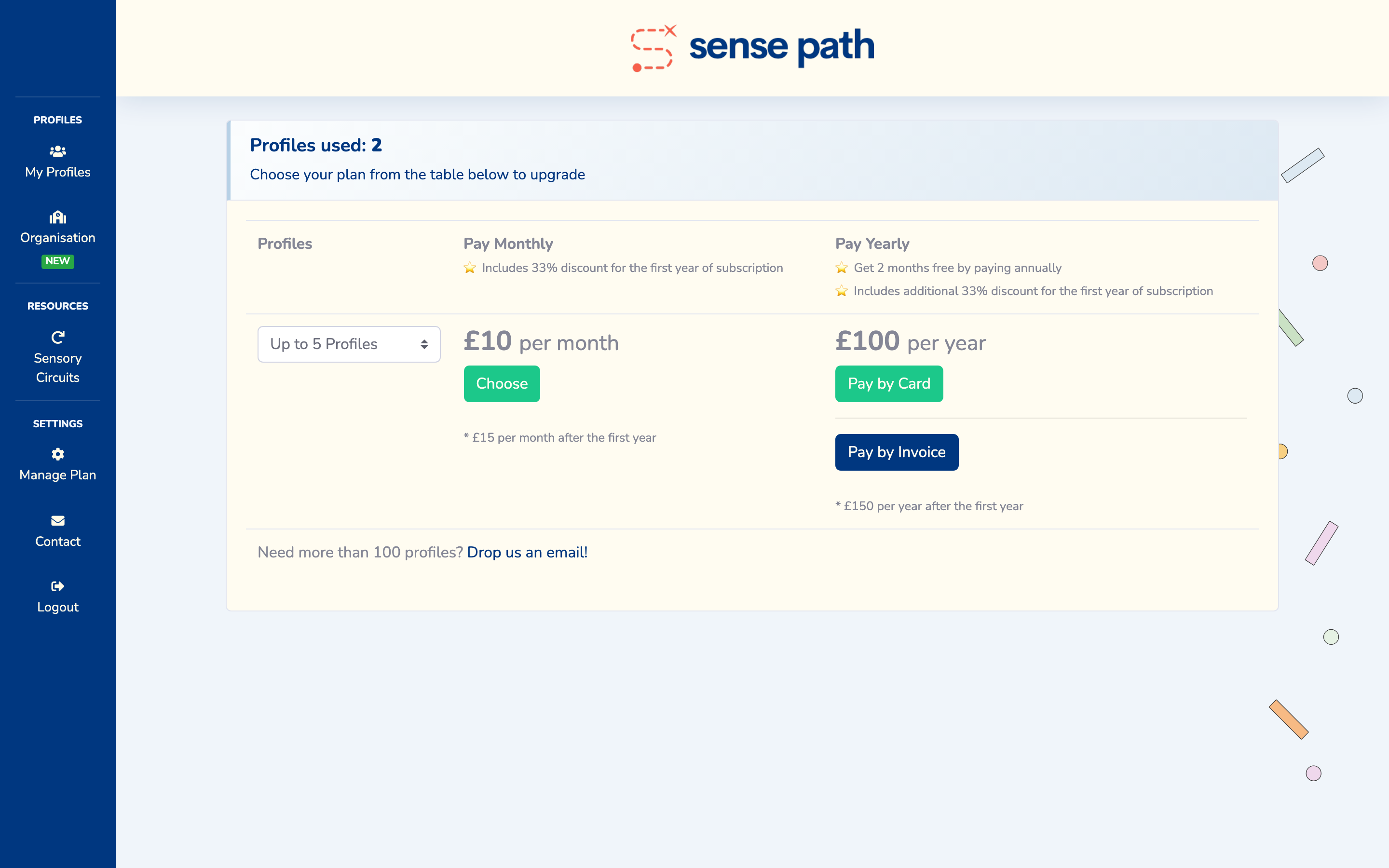
- Select the plan that matches the number of profiles your school needs.
- Click Pay by Invoice.
- Enter the following billing details:
- Billing Name — the name to appear on the invoice (e.g., your school's name)
- Address Line 1 — street address
- Address Line 2 — (optional)
- City/Town
- Postcode
- Confirm the details and submit.
An invoice will be generated and emailed to the account email address. Payment is due within 14 days.
Invoice Details
Each invoice includes:
- Invoice number
- Date of issue
- Billing name and address
- Subscription plan and period
- Amount due
- Payment due date
- Payment instructions
Invoices are issued by Sense Path Ltd (Company Number: 15785318).
Subscription Plans
Sense Path uses a simple, profile-based pricing model. All features are included on every plan — you only pay for the number of profiles you need.
The free tier includes up to 2 profiles at no charge. Paid plans increase in increments of 5 profiles.
Visit sensepath.org for current plans and pricing. The Upgrade page in the app lists all available plan sizes when you subscribe.
Annual vs Monthly Billing
- Annual billing is paid once per year.
- Monthly billing is paid each month.
- Both options are available for card and invoice payments.
Visit sensepath.org for how plans differ by billing cycle.
We recommend annual billing for schools, as it simplifies budgeting.
Purchase Orders
If your school requires a purchase order (PO) number on the invoice:
- Contact us with your PO number before or after the invoice is created.
- We will re-issue the invoice with the PO number included.
Note: Stripe (our payment processor) does not allow editing invoices after they have been issued. If a PO number needs to be added, we will void the original invoice and re-issue a new one with the correct details. Your subscription will not be affected.
Viewing and Downloading Invoices
You can access your invoices through the Subscription Portal:
- Go to the Upgrade page in the app.
- Click Manage Subscription (or Billing Portal).
- In the portal you can view and download all past invoices as PDFs.
Alternatively, invoices are emailed to your account email address when they are issued.
Updating Billing Details
To update your billing name, address, or email:
- Go to the Upgrade page → Manage Subscription.
- In the billing portal, update your details.
If you need to change the email address that receives invoices, contact us.
Renewals
Subscriptions automatically renew at the end of each billing period (monthly or annually).
- For annual subscriptions, a renewal invoice is issued approximately 14 days before the renewal date.
- For monthly subscriptions, renewal happens automatically.
If you need to cancel or change your plan before renewal, see below.
Changing Your Plan
To upgrade or downgrade:
- Go to the Upgrade page → Manage Subscription.
- Select a different plan.
Upgrades take effect immediately and the cost difference is pro-rated. Downgrades take effect at the next billing cycle.
Cancellation
To cancel your subscription:
- Contact us with at least 30 days' notice before your next renewal date.
- Or cancel through the billing portal.
Your access continues until the end of the current paid period. After cancellation:
- You can still log in and view existing data.
- You will not be able to add new profiles beyond the free limit (2 profiles).
- Your data is retained for 30 days after the subscription ends, then deleted.
Important: Export any data you need before your subscription ends. Contact us to request an export.
VAT
Sense Path Ltd is not currently VAT registered. Prices shown are the total amount due and do not include VAT.
Supplier Details
For schools that need to set up Sense Path as a supplier in their finance system:
| Field | Details |
|---|---|
| Supplier Name | Sense Path Ltd |
| Company Number | 15785318 |
| Registered Address | 20 Shaw Road, Newhey, Rochdale, England, OL16 4LT |
| contact@sensepath.org | |
| Sort Code | 82-19-74 |
| Account Number | 20223492 |
| Payment Terms | 14 days from invoice date |
Contact
For all billing and invoicing queries, contact us.
Last updated: March 2026